

Screen time
Screen time by age: how much is too much for your child?
Hami Team8 min read
 Hami Team7 min read
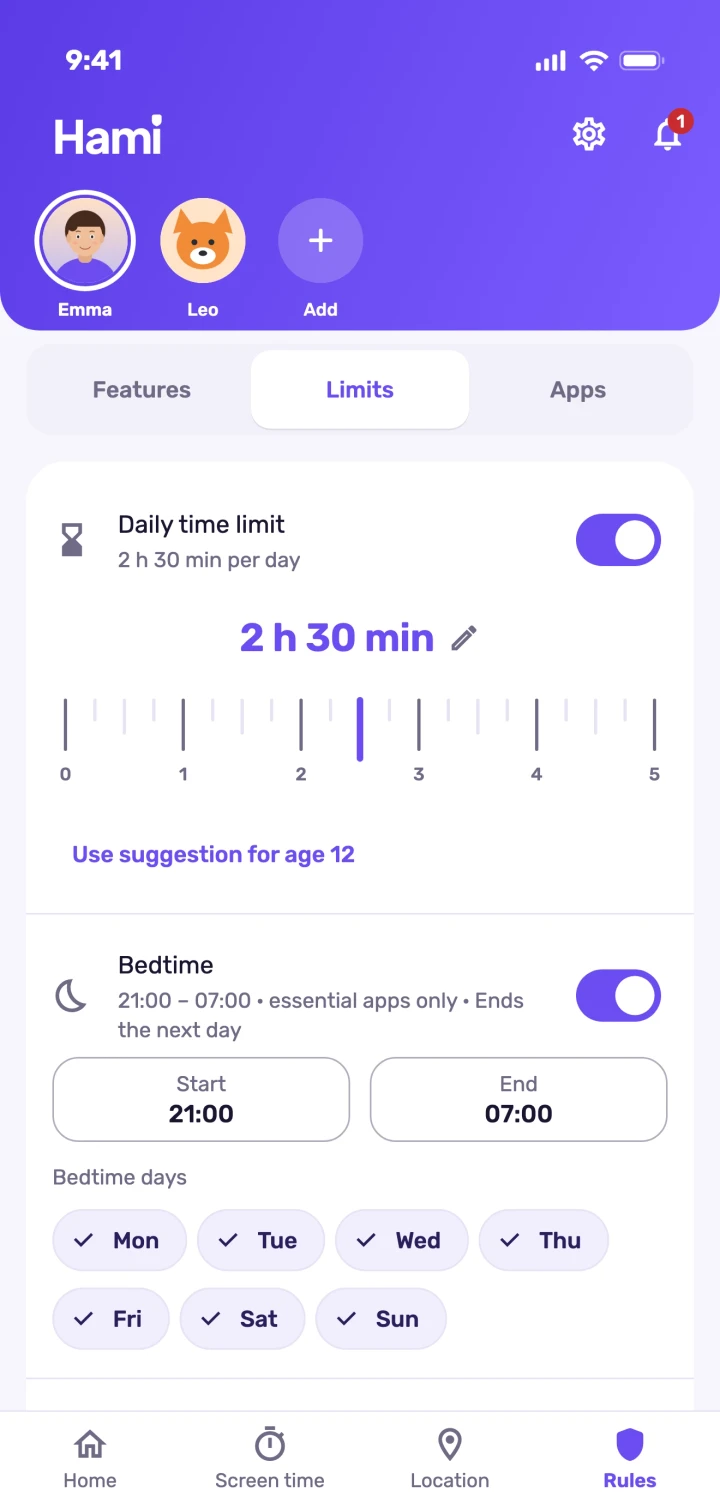
A daily screen time limit lets your child use the phone for a set amount of time each day and locks apps when that time is up. In Hami you set the limit from your own phone; Hami Kids on your child's phone enforces it and shows the child how much is left. It works on Android and on iPhone, with one difference: on an iPhone the limit counts total screen time, because that is how Apple's rules work.
Below: what the limit does, how to set it up, what happens when it runs out, and where the two platforms differ.
Say you choose two hours. The counter starts when your child picks up the phone in the morning. Games, video, social apps all draw from the same pool. When two hours are gone, apps lock and the screen says why. At midnight the counter resets.
The limit runs independently of bedtime and school time. If bedtime starts at 9 pm, the phone goes quiet at 9 pm even if the child has not used the two hours. The rules stack, and whichever is stricter wins.
What it does not do: a daily limit does not give individual apps their own time. If you want "YouTube 30 minutes, games 45 minutes", that is a separate rule, a per-app time limit. You can run both at once.
There is no short answer; Screen time by age goes into detail. The practical advice: start near what your child uses today and step down over a few weeks. Hami suggests a starting point based on the child's age when you add them, and you change it as you like.
Wanting a different rule for the weekend is normal. Hami keeps one daily limit value; for a looser weekend, most families simply add bonus time that day or switch the limit off temporarily.
That is all. If you selected the feature during setup, the limit may already be on; you change it from the same screen.
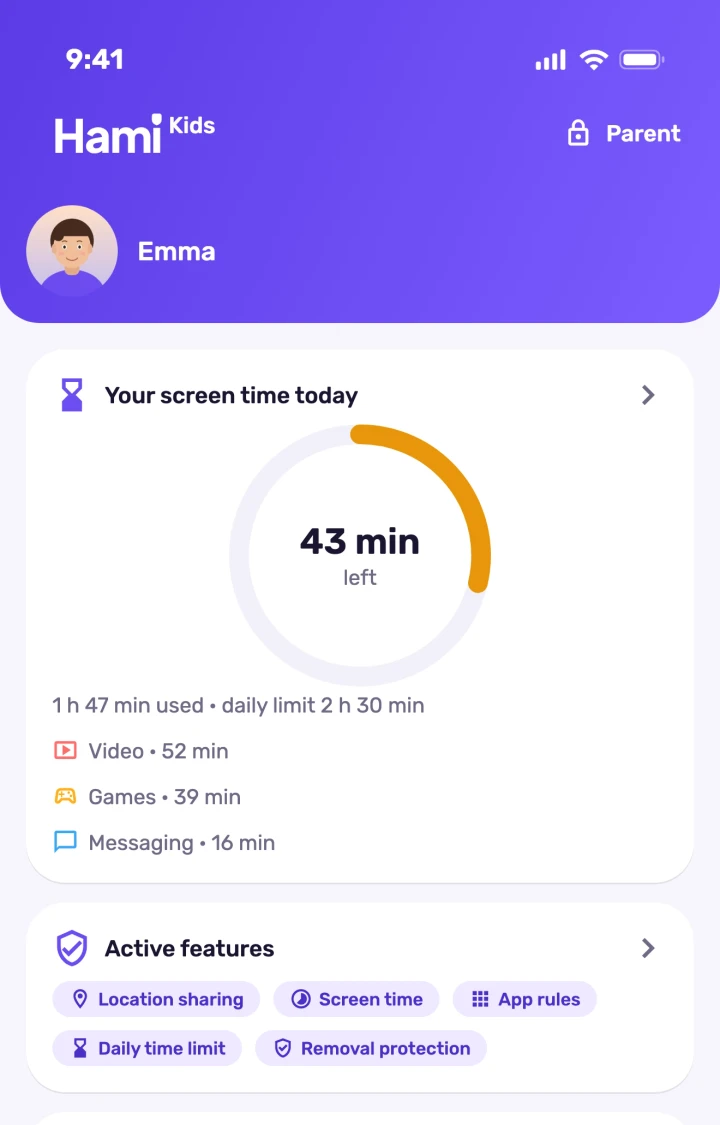
Hami Kids shows a ring on its home screen with the time left for today. When it reaches zero, apps lock and the lock screen gives "daily limit" as the reason. From there, or from Hami Kids, the child can tap Ask for more time; the request arrives on your phone as a notification. You tap Approve and choose how much to add, or decline. The child gets a "bonus time added" notification. The whole request flow, including new-app requests, is in how requests work in Hami.
Even without a request you can add time from your own phone (+15 min, for example), pause the phone for a while so homework gets done, or lock it instantly.
Android. Hami Kids can see which app is in the foreground, so the limit counts apps individually and your screen time report shows how long each app was used. Requests for more time arrive instantly.
iPhone. Apple restricts parental control apps to its Screen Time API. For the daily limit that has three consequences:
These differences come from Apple, not from Hami, and apply to every app that uses the same API. The full list is in What parental controls can do on an iPhone.
All three stop the phone, but for different jobs. The daily limit is a standing rule that runs by itself every day; it is for routine. Pause is a break for a set time: "pause 45 minutes until homework is done", after which the phone opens on its own. Instant lock lasts until you lift it: at the dinner table, at a relative's house, when a conversation needs to happen; you unlock from your phone or with the parent PIN on the child's. Reaching for pause rather than editing the rule whenever the limit does not fit the day keeps the rule consistent and the exception visible.
A few common situations:
Pick a number together with your child, turn on the daily limit under Rules in Hami, and look at the weekly report a week later. The report tells you whether the number fits this family. If you have not set Hami up yet, Set up Hami in 5 minutes is the shortest route.
No. Apps lock and the lock screen says why; your child can open Hami Kids and send you a request for more time. From your own phone you can add a few minutes or switch the limit off for the day.
On an iPhone the daily limit counts the phone's total screen time, because of Apple's Screen Time API. To give one app its own time, you set a time limit for that app on the child's iPhone.
Yes, the day renews at midnight. Any bonus time you give applies to that day only.
No. Rules are set from your phone, and the parent settings on the child's phone are protected by a PIN. The child sees which rule is on in Hami Kids but cannot change it.
Screen time
Hami Team8 min read
App limits
Hami Team6 min read
Screen time
Hami Team7 min read
Set it up in about five minutes. Your child can always see which rules are on.