
Conditional time: let minutes in a reading app turn into game time
7 min read
Conditional time is a rule that lets an app open only after a set amount of time has been spent in another app. In Hami it reads like this: when your child spends 20 minutes in a reading app, the game opens for 30 minutes; the rule can repeat each time or run once a day. The total daily limit still applies. On Android you set it from your own phone; on an iPhone, from the parent settings on the child's iPhone.
It is a way of having the phone say "homework first, then games" so you do not have to say it every day.
Why "first this" instead of "no"
Rules that only restrict leave a child with one message: the phone is bad. Conditional time says something different: there are good things to do on the phone, and they open the door to the fun ones. For a nine-year-old, "half an hour in the book app, then half an hour of the game" is a deal that feels understandable and fair. Better still, the bargaining moves from you to the rule. The child watches the counter fill up instead of working on you.
Turning everything into a transaction is not a good idea either. Tying the pleasure of reading to a reward can backfire. Most families use this for one or two apps and for a period: until a new language app becomes a habit, or to keep homework going over the holidays.
How the rule works
It has three parts:
- The earning app: where the child spends time first (reading, maths, language, coding).
- The reward app: what opens afterwards (a game, video).
- The minutes: how long in the earning app, how long in the reward app.
Then there is the Repeatable switch. On, every 20 minutes of reading earns another 30 minutes; off, the rule runs once a day. In both cases the total daily limit sits on top: if the child has finished the day's time, earned minutes cannot be used that day. Earned time resets at midnight.
If the child tries to open the reward app before the condition is met, it appears locked and the lock screen says why. When the condition is met, the child gets a "+30 min unlocked" notification, and a "2 minutes left" warning near the end.
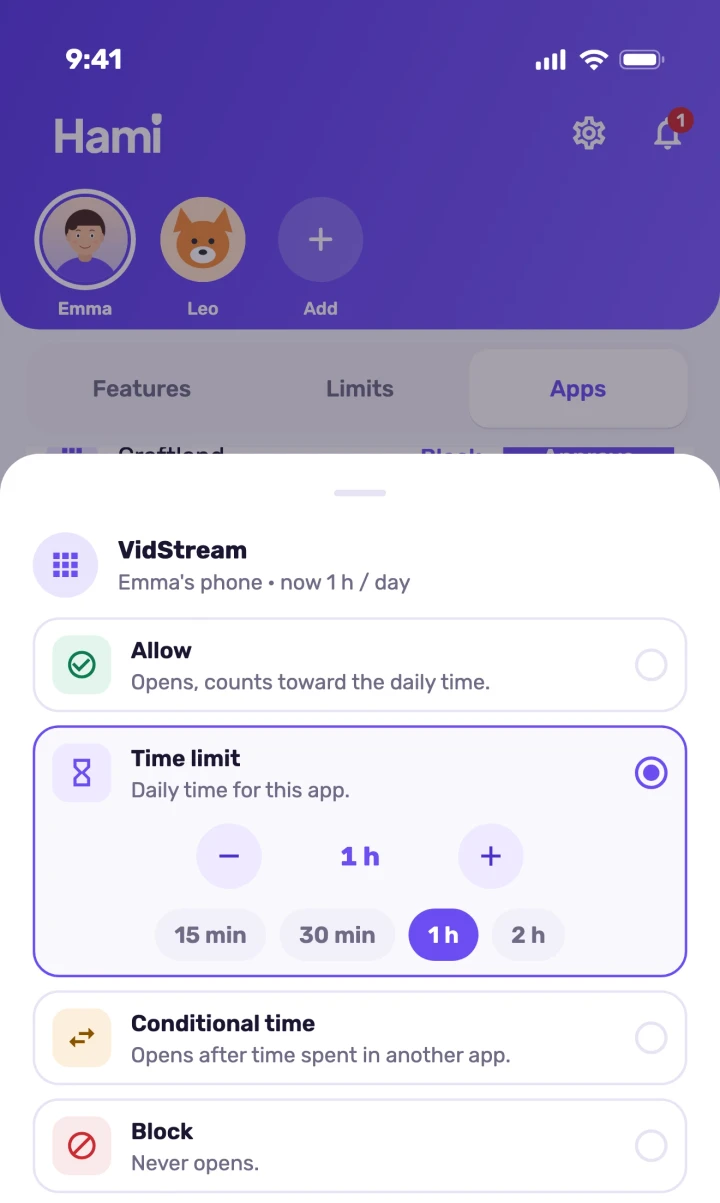
Setting it up on Android
- In Hami, choose your child and open Rules › Apps.
- Tap the app that will be the reward (the game, say), choose Conditional time and tap Continue.
- At "Which app should be used before this one?", pick the earning app. Blocked, always-allowed and waiting apps are not offered.
- Set the earning minutes and the reward minutes; turn on Repeatable if you want.
- Read the summary sentence ("Ali spends 20 min in Reading, then Game opens for 30 min, every time") and save.
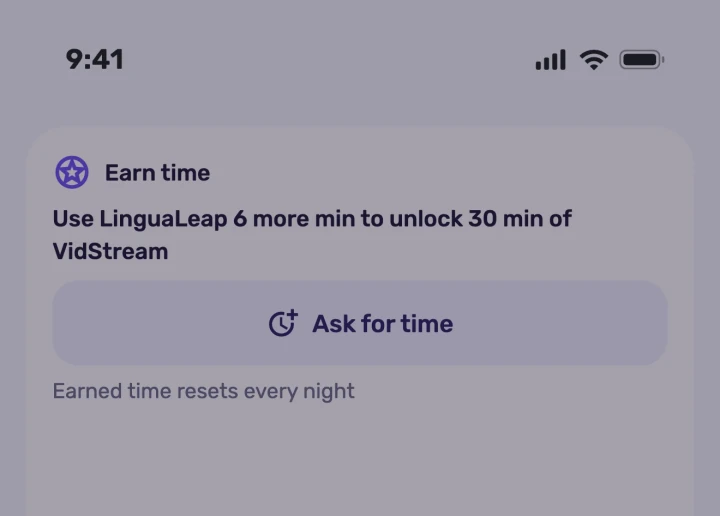
On the child's phone, Hami Kids shows an Earned time card: how much was earned, how much is left, when it resets. If the child leaves the earning app open without touching the screen, earning pauses and the card asks them to tap to continue.
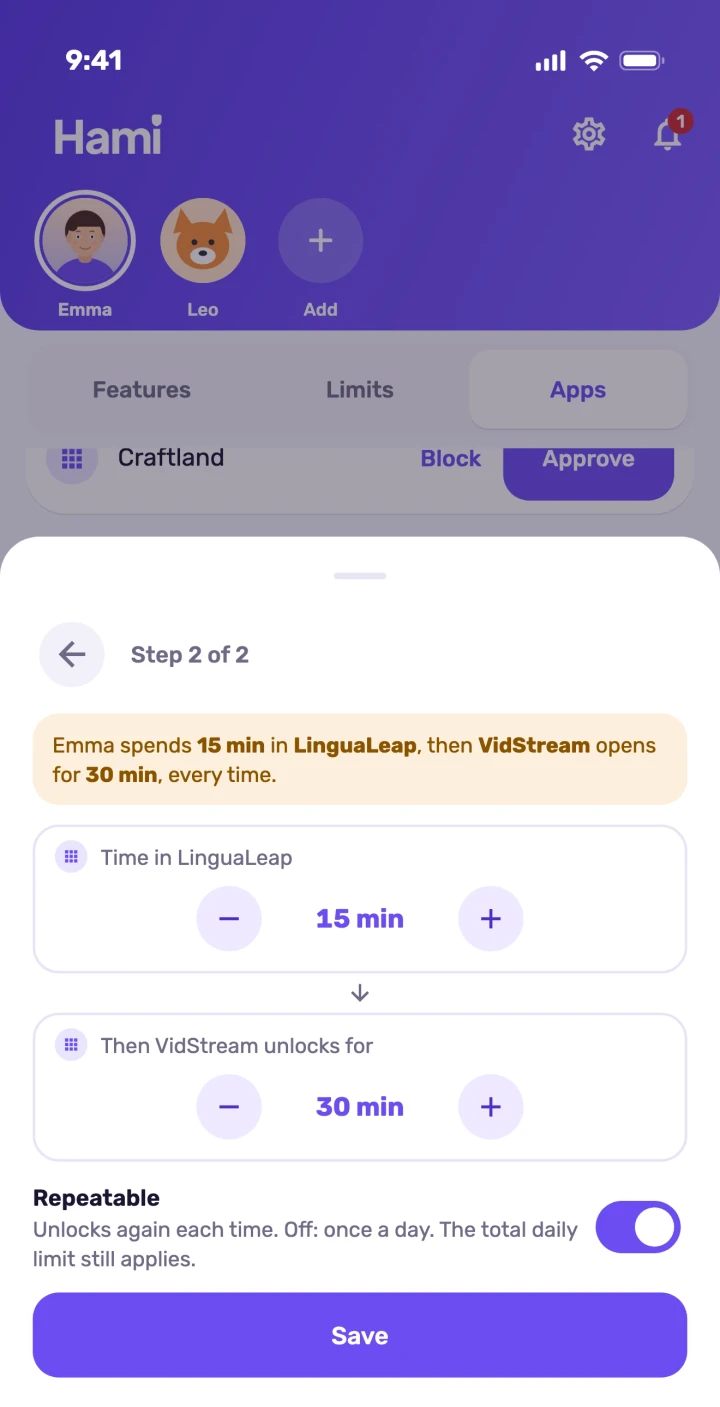
Setting it up on iPhone
On an iPhone the rule has the same name, Conditional time. Because Apple only lets apps be chosen on the iPhone itself, the rule is set on the child's phone, from the same rule sheet as on Android:
- On the child's iPhone, open Hami Kids, tap the Parent button at the top and enter your PIN.
- Under "App rules on this iPhone", tap Choose an app to add a rule and pick the reward app (the game, say) in Apple's picker. When the app appears in the list, tap it.
- In the rule sheet that opens, choose Conditional time and tap Continue.
- Apple's picker opens again ("App to use first"): pick the earning app. Exactly one app can be chosen; a category will not do.
- Set how long the child spends in the earning app and how long the reward app opens for; turn on Repeatable if you want. Tap Save.
The iPhone applies the rule immediately; Hami on your own phone shows the summary ("20 min of the earning app unlocks 30 min of the reward app") after the next sync. Apple does not share app names with Hami.
Start knowing two limits. The iPhone counts time in 5-minute steps, so a 20-minute condition is met somewhere between 20 and 25 minutes. And an iPhone cannot tell whether an open app is in use; a phone lying on the table with the reading app open counts too. That is Apple's design, not Hami's. The other differences are in the iPhone guide.
Which apps make good earning apps?
Technically the rule accepts almost any app, apart from blocked, always-allowed and waiting ones. In practice the ones that work are apps the child actually does something in: reading, maths and language apps, coding, instrument practice. The ones that do not are "just leave it open" apps: a music player, a notes app, a passively watched video channel. Android pauses earning when the screen is not touched, but watching a video needs no touching either, so think twice before putting a video app on the earning side. Age matters too: at seven or eight even ten-minute conditions feel long; from twelve, twenty to thirty minutes sits comfortably.
Settings that tend to work
- Short condition, short reward. Fifteen minutes of reading for twenty minutes of play works better than sixty for ninety. The child sees progress.
- One reward app. Tying several games to a condition at once makes the rule unreadable. Pick the one played most and, if needed, give the others a time limit.
- Check the weekly report. The "Time earned" line shows how much was earned this week. Nothing earned means the condition is too heavy; always earned and used up may mean the rule is no longer needed.
- Explain it. Hami Kids shows the rule, but the "why" comes from you.
Next step
Choose a learning app your child already uses a little and tie it to the game they play most, starting with a small trade such as 15 minutes for 20. The screen-by-screen steps are in the app time limits and conditional time guide. If Hami is not set up yet, the 5-minute setup is enough.
Frequently asked questions
What is conditional time?
A rule that lets one app open only after a set amount of time has been spent in another app. For example, 20 minutes in a reading app unlocks a game for 30 minutes. You can make it repeatable or once a day.
Can earned time exceed the daily limit?
No. Conditional time works inside the total daily limit. If the child has used up the day's time, earned minutes cannot be used that day; Hami Kids says so plainly.
Can my child leave the reading app open and wait to earn time?
On Android, Hami Kids notices when the screen is not being touched and pauses earning; the child is told to tap to continue. On an iPhone, Apple counts time in 5-minute steps and cannot tell whether an open app is actually being used.
Is conditional time available on iPhone?
Yes, under the same name, Conditional time. The rule is set on the child's iPhone from the parent settings in Hami Kids: pick the reward app, choose Conditional time and Continue, then pick the earning app and the minutes.
Does earned time carry over to the next day?
No. Earned time resets every night; the child earns again the next day.
Keep reading
- App time limits: how to give YouTube or a game its own daily allowance
When a per-app limit makes more sense than a total, how to set one in Hami on Android and on iPhone, and how it differs from blocking and category locks.
- How to set app time limits and conditional time
How to set a daily time limit on a single app and set up conditional time in Hami: from your own phone on Android, from the parent settings on the child’s iPhone, step by step.
- What parental controls can do on an iPhone (and what they can't)
What a parental control app can and cannot do on an iPhone, because of Apple’s Screen Time API, and how Hami works within it.
Download Hami
Set it up in about five minutes. Your child can always see which rules are on.