
Transparent parental control versus secret monitoring: why your child should know
7 min read
Transparent parental control means the child knows there is an app on the phone, which rules are on, and what their parent can see. Secret monitoring is the opposite: the app hides, the child is not told, messages are read. Hami chooses the first, because secret monitoring is usually discovered, destroys trust when it is, and teaches the child one thing only: to hide better.
This article sets out the difference between the two approaches with goodwill but without blurring it. The thought "for my child's safety I need to look without them knowing" comes from an understandable place and deserves an answer.
Why secret monitoring looks tempting
Fear. Your eleven-year-old shuts the bedroom door and stares at the phone, you do not know who they are talking to, and the news stories are in your head. "If they know, they will hide things; if they don't, I will see the truth" sounds logical.
The problem is that what you are looking for in order to see the truth changes the relationship itself. Once you have read a conversation, you cannot behave as though you have not. One day your child asks "how do you know that?". The answer at that moment is either a lie or a confession. Both are expensive.
Hidden apps get found
Children know phones better than we do. A service running in the background under battery settings, an unfamiliar name among the accessibility permissions, a VPN icon in Settings. Android lists such permissions openly; Apple keeps parental control under Screen Time where the child can see it and does not allow hidden apps in the first place. So an app that promises "invisible" is either not really invisible or was installed by breaking the stores' rules.
The moment it is found, the problem is no longer screen time. The problem is the sentence "my parents were spying on me". In adolescence, the price of that sentence is far higher than an extra hour on the phone.
What an open rule does
An open rule does not mean the child will keep it. It means the child knows what they are trying to keep. That small difference changes three things:
The argument moves. With a hidden rule, the fight is about "why are you watching me?". With an open one, it is "9 pm is too early, make it 9.30". The second is a healthy negotiation and good practice for setting their own limits later.
Lying becomes pointless. If the child knows their location is visible, they do not say "I'm at the library"; they say "I'm at the park". And you use that to say "don't be late", not to catch them out.
The child uses the tool too. The SOS button, asking for more time, saying "this site was blocked by mistake". These work when the app is something the child knows about; if it is hidden, none of them exist.
How Hami puts transparency into practice
Saying it is easy, so here are the concrete things:
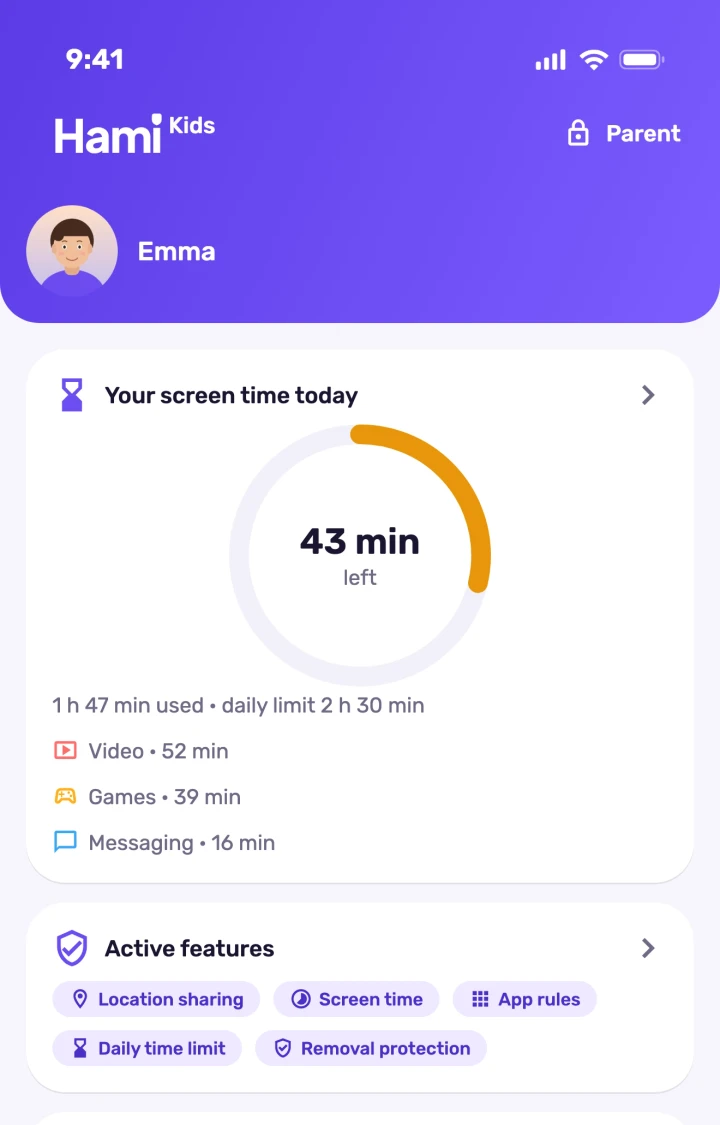
- A visible icon. Hami Kids sits on the home screen with its own icon. It cannot be hidden.
- A persistent notification. On Android, Hami Kids is visible in the notification area while it runs. When location is on, that notification is always there.
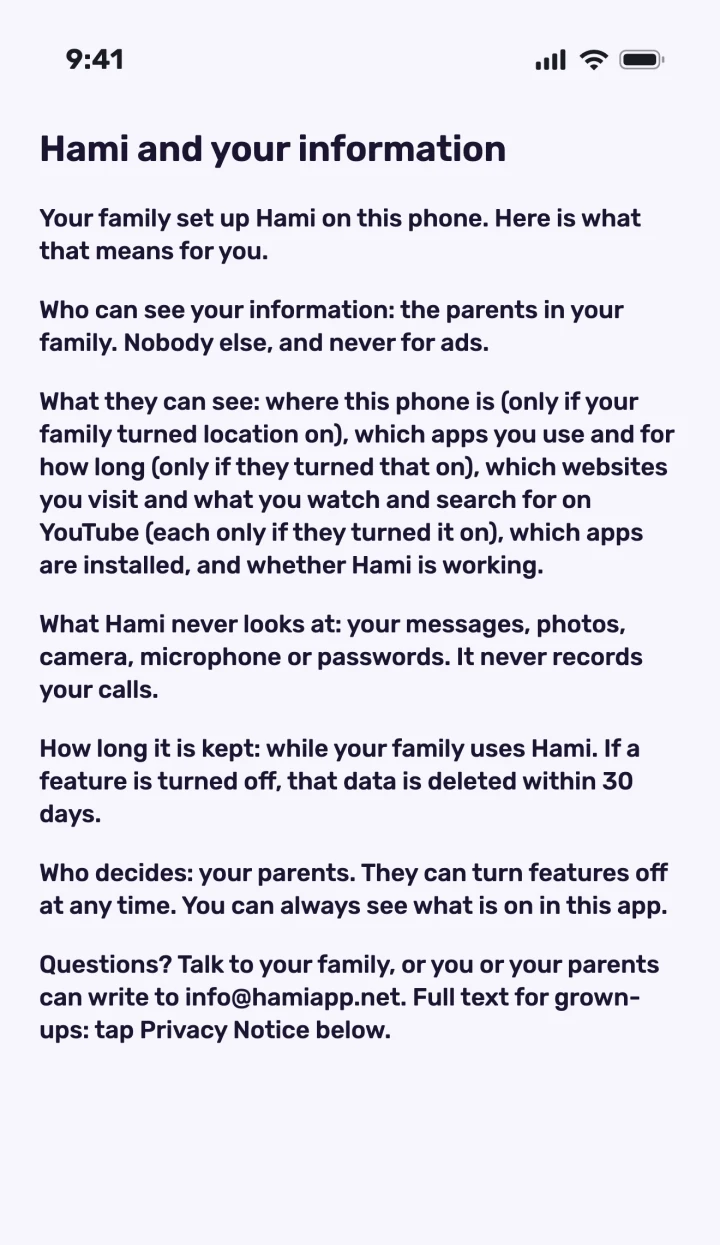
- The "What my parent can see" screen. When the child opens the app they see which features are on: location, screen time, site rules, bedtime. There is also an information section: who can see their data (only the parents in the family), how long it is kept, who decides.
- The lock screen gives a reason. When the phone locks it says "bedtime", "daily limit" or "locked by parent"; the child understands the rule is working, not that the phone is broken.
- Permissions are explained one by one. During pairing the child reads what each permission is for. The Android accessibility permission, for example: to know which app is open; never messages, passwords or anything typed.
- If something is turned off, you know. If the child turns off protection or revokes a permission, you get a "protection tampering" notification. That is not hidden either; the child sees in Hami Kids that removal protection is on.
What Hami does not do is part of the list too: no message content is read, the microphone is never used, the screen is not recorded, passwords are not seen, and the camera opens only for the pairing code. Even the optional site history and YouTube history on Android work at the level of domain names and video titles only, the child is told they are on, and they are deleted after 30 days.
Honesty about limits, too
Transparency applies towards you as well as towards the child. No parental control app can promise that a determined child can never remove it. On Android, Hami Kids is protected against removal and uninstalling requires the parent PIN; on an iPhone it depends on whether the child uses a child Apple Account in Family Sharing. Hami says so plainly in the app and suggests an extra step for iPhone. Details are in Protecting Hami Kids from removal.
The limits Apple places on iPhone (the daily limit counting total time, no category lock) are written on Hami's screens too, not hidden in marketing copy. The iPhone guide is the full list.
How to tell your child
It changes with age, but this frame works: say what you are going to do first, then set it up, and be there while you do. "We're going to install Hami Kids on your phone. Games will go quiet after 9 pm, I'll be able to see where you are, and I won't read your messages. You can see all of this in the app." Then read the first screen of Hami Kids together; it says the same things.
And talk again from time to time. Rules are not fixed; they loosen as the child grows. The bedtime set at thirteen changes at fifteen. Changing it together keeps the rule as "how the house works" rather than "punishment".
Next step
If you came here looking for a hidden app, this article may have talked you out of it; good. Instead, have a conversation with your child this week: which rules, which hours, what you will and will not see. Then set up Hami together; doing the second step side by side on the child's phone is the whole of this article in one gesture.
Frequently asked questions
Is it legal to secretly monitor my child's phone?
It varies by country and age, and this article is not legal advice. In most places a parent may manage a minor child's device; reading message content and accessing third parties' conversations is a separate and problematic area. That is why Hami never touches message content.
What does transparent parental control mean?
The child knows the app is on the phone, which rules are on and what the parent can see. Hami Kids' visible icon, its persistent notification on Android and its 'What my parent can see' screen exist for this.
If my child knows, won't they try to get around it?
A determined child may try to get around any app, hidden or not. The difference: with an open rule the argument is about the rule itself, and the child learns to negotiate rather than to avoid getting caught. Hami still offers removal protection and tamper alerts.
Can Hami read WhatsApp messages?
No. Hami never reads message content, never uses the microphone, never records the screen and never sees passwords. The camera is used only to scan the pairing code.
Keep reading
- Protecting Hami Kids from removal (Android and iPhone)
How to stop Hami Kids being deleted from your child’s phone: the parent PIN and tamper alert on Android; Family Sharing or a Screen Time passcode with “Deleting Apps: Don’t Allow” on iPhone.
- What parental controls can do on an iPhone (and what they can't)
What a parental control app can and cannot do on an iPhone, because of Apple’s Screen Time API, and how Hami works within it.
- Set up Hami in 5 minutes
How to set up Hami in about five minutes: install on your phone, install Hami Kids on your child’s phone, enter the code and choose your rules.
Download Hami
Set it up in about five minutes. Your child can always see which rules are on.